Making An 2D Platformer
Here’s a link to the 2D Platformer that i created
https://walkerscrisps.itch.io/2d-platformer-prototype
What is a 2D Platformer?
A 2D platformer is where the player will have to overcome obstacles such as jumping on platforms, defeating enemies and the focus in these types of games is to avoid all of the obstacles and to get to the end of the level and it will be in a 2D side-scrolling perspective like for example the original Super Mario Bros on the nes is an example of this type of game as the player had to get past all of the obstacles which mainly involved the player jumping and running to get to the end of the level.
The Process of Making a 2D Platformer in Unity
For this project I will use another asset pack from Kenney.Nl like how I did with the top-down shooter that I created previously and the asset pack that I will be using will be one for a 2D platformer and since that will be the type of game that I am going to create this will be perfect to use for this project and now I will import these assets into Unity by dragging them into the assets window in the editor.
The next thing that I need to do is create a small level that the player will be able to run around in so I drag all the assets that I need onto the scene view such as the player sprite, platformers that the player will be able to jump on when I set that up later.
Making the Player Behaviour Script
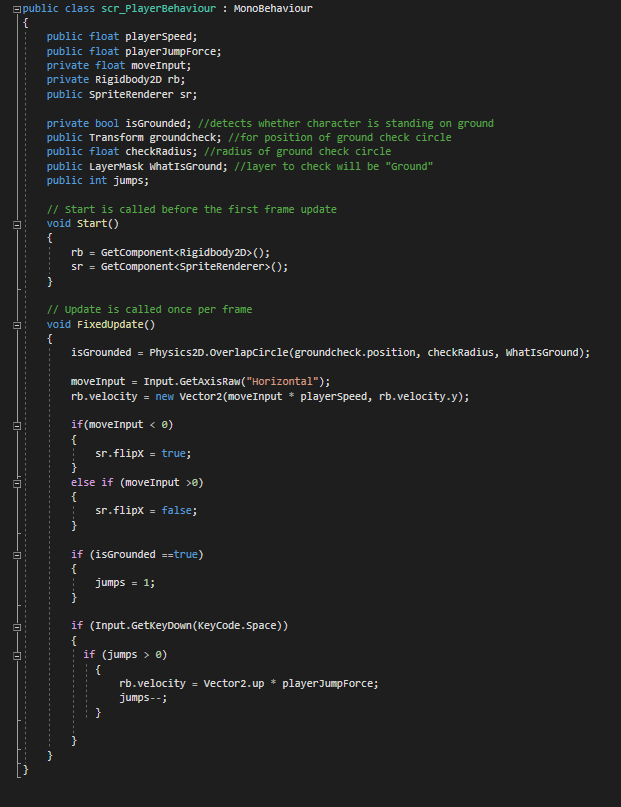
This script will contain all of the functions relating to the player object such as being able to move left and right and being able to jump and to set all of this up the first thing I needed to do was create 3 float variables for the player’s speed, the player’s jump force and this variable will determine how much float they will be when the player jumps and lastly a variable for the input so the player will be able to move left or right.
Making a Layer for the ground
The way I set up the player object to be able to move is the same way as I did it with my previous prototypes however there were some differences that I needed to add since this was going to be a 2D platformer and these differences were that I was going to make a variable that will check what the player was standing on was ground and if it was they would be able to walk on it and to set this up I made a layer mask for all of the ground objects and to make a layer mask you do into the unity editor and it’s similar to the way that you make tags as you go onto the object that you want to make a layer and then it will let put in the name of whatever you want to call this layer and in this case I will be calling it the ground layer.
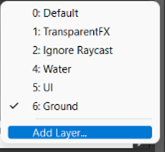
Also, this script will check if the player walking on that layer by checking their current position and if they are currently on the ground then will be able to jump into the air and land back onto the ground without falling through it since this script is checking if the player object is on the ground or not.
Also, the last thing I want to add to this script is to allow the player sprite to change directions depending on which way the player is currently facing and to do this by making two if statements and these a if statement where that the player move input was less than zero it would flip the sprite in the other direction and if it was greater than zero it wouldn’t flip the sprite.