Creating a Fog Effect
Another effect I wanted to create was fog in one of my environments. For that environment, I tried to make it look like a horror game such as Silent Hill, so I want to give the environment very dense fog so you won’t be able to see where you’re going clearly, and it makes it feel more like a horror game because it could feel unsettling.
To set up the fog, I followed a tutorial on YouTube to help get the look that I wanted to have and below is the tutorial that I used to set this up.
Like last time when I created the Pixelation effect, I will need to create a material for the fog that will be applied to a post-process volume so it can affect the whole scene that the material will be in so firstly in the material editor, I need to define what colour the fog will be and the location of the fog texture.
So, to do that, I will use a texcoord to get the coordinates of a texture, then plug that into a scene texture and lastly, that into a mask which acts as an overlay on this material. Then I will press v and left-click in the material editor, which will add a colour parameter to it, allowing me to select the colour I want the fog to be, and, in this case, I will be going with the colour white.
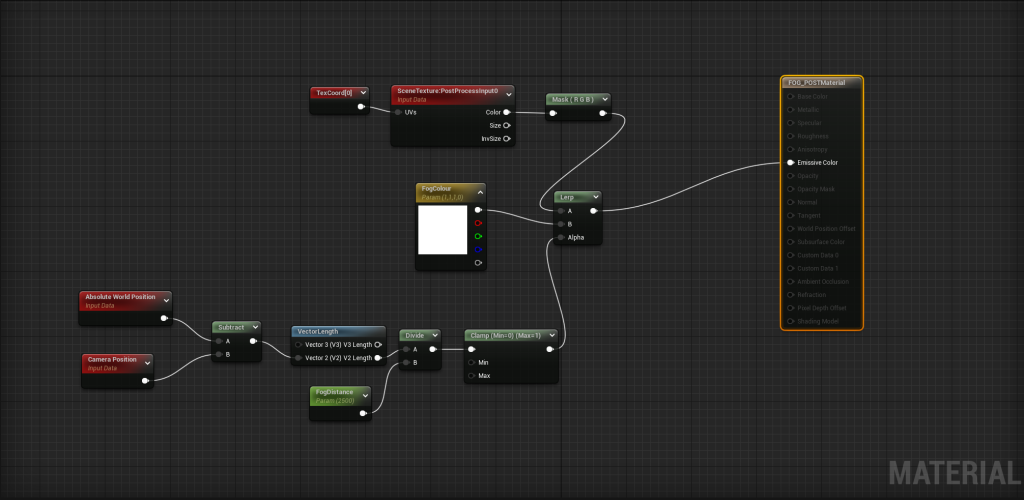
Now I will add a lerp that I will plug in the mask and the fog colour into and then plug into the emissive colour of the material. Lastly, I need to define the distance of what the fog will be.