Final 360 Video & Dev Log
360 Video With Narration
360 Video with No Narration
What is My Project?
My project is a 360 video horror experience where you explore an post apocalyptic city where you are just trying to survive by looking for suppiles and helping any other survivors when you come across them and watching out for any danger such as monsters, zombies etc.
Limitations of 360 Videos
One of the biggest limitations of creating a 360 video compared to just making a normal VR game is that you can’t interact with the environment since it’s just a video you can just look around so you are limited on what you do and show the viewer but still compared to other options this still make you feel like you are in that world and can get immersive in it if you done right.
Failed Version in Unreal Engine
Before, I decided to move over to Blender to create my 360 video I tried it first in Unreal and a couple of things went wrong such as I tried to use a plugin that would automatically create a city based on map data in theory this sounds like a great way to save time than just manually creating a city enviroment and this one I could modify such as moving the buildings, changing the textures once it was created from this map data however it proved to be very unstable.
This made me waste alot of time trying to get it to be stable so I could work on the project instead of just making it from scratch myself which I have alot of exprience in creating a environments in Unreal so next time I know I shouldn’t try to cut corners and take a easier route instead of putting in the work myself and trying to rush things when I didn’t need to.
Also, the other issue I had trying to make this project in Unreal was getting the 360 camera itself to work for the 360 camera I tried to use offworld but even thought I looked a the offical documentation it was abit more difficult to get it all working and more effort when compared to the Blender it’s way more simple as a 360 camera is built into the software instead of being a plugin that you add to it to get it working so this was even more time wasted I could of just spent working on it in Blender.
Creating the City In Blender
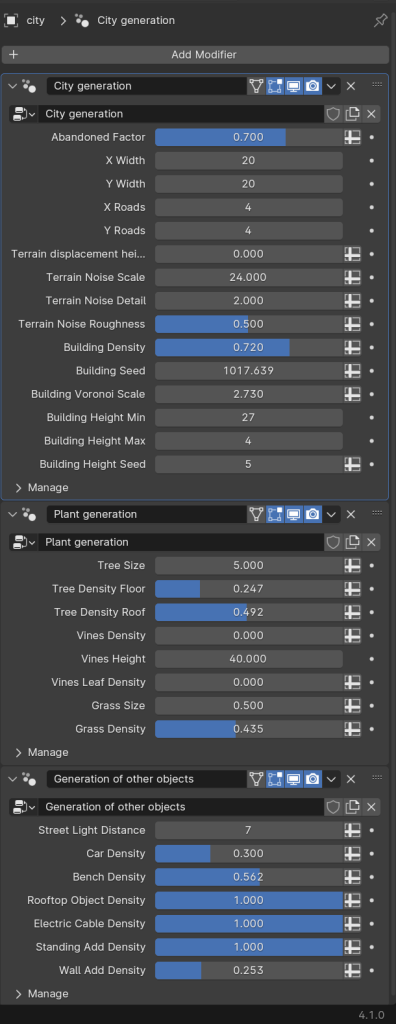
Since I lost alot of time trying to create it in Unreal I needed a quick way to create a environment when looking into this I found an abandoned city generator and with this I could customise very options such as how long the roads will be, how much foliage there would be, how much grass there would be. Just changing some options in Blender it would have been better if the environment was completly original to me however with how many options there I would still be able to create something completly unique to how I wanted the city to look.
Using the Timeline in Blender
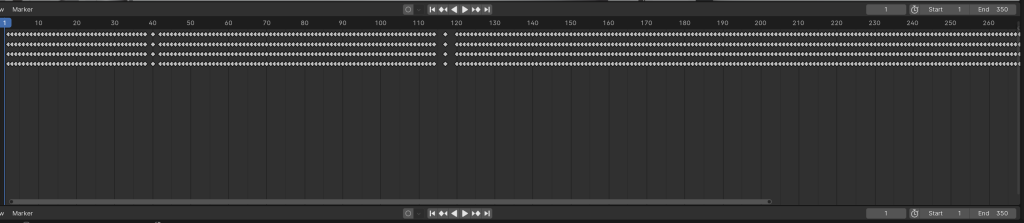
Now, that I had a environment I needed to animate it and for this since I wanted to make it feel like you were walking around the environment I needed to make the camera itself move to do I decided to use walk navigation option which allows you to control the camera like you would control a normal game on PC so you use WASD to walk around and the mouse for camera movement and using this with the combination of auto keying which is way it automaticallyplace keyframes onto the timeline every time I moved the camera.
The only downside of this approach is you need to be very careful with your movement as if you accidently shake the mouse or move in a weird way this will show up in the video so if this happens I had to go back and do it again until I got the movement excatly how I wanted it to be. Now after this is all done I just needed to render the video this can be done just going to render animation button in the UI and create images of each frame which when done which have to put into a video editor to make it a video.
Editing the Video In Premiere Pro & Render Settings
Now, all the frames have been rendered I put them into premiere pro however when making the video in blender sometimes the video might be abit longer then expected to due how many frames they are and to fix it all I had to was speed up the video to get it to the length it was supposed to be.
Also, when creating it in Blender I forget to add audio so a quick fix instead of rendering the video again with audio was add audio directly into Premiere Pro instead this still gets the same results but with less control on how it will effect the video itself so I decided to go with simple footsteps and ambience noises if I added the footsteps in blender itself I could time them with the movement of the camera so the audio would be synced more accurately but still the results still sound great and adds more to the experience if the audio wasn’t there at all.
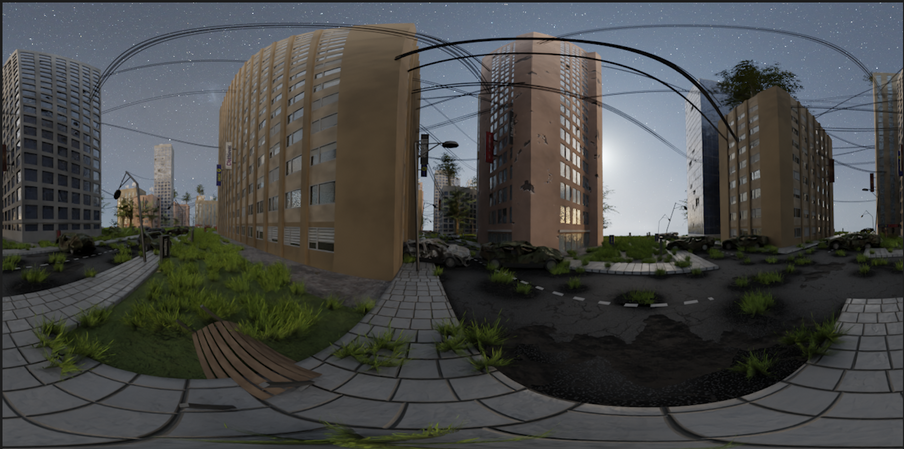
Also when rendering in Premiere Pro I needed to make sure this video is for VR option was ticked otherwise the video wouldn’t be displayed correctly when played on Youtube it would look like the picture below when not displayed correctly.
Project Management

I used Hack & Plan to help my manage my project and how it helped was by that I could add various tasks on there and I could set myself personal deadlines to get those specific tasks done by this way it help me manage my time so I got everything done in time efficent manner and it helped me not forget what haven’t been done yet and what I had already completed.
Also how I orgainsed it was by each week so once one week was over I would create a seperate board for the tasks for that week so this helped it from not getting clutter and confusing by all the tasks being one board and this weeks it helped me see if i was on track or way behind and I needed to speed up on some tasks.
What I could have done to Improved my Project
Now, that I have completed my project I am going to look back on what I could have done better to overall create a better experience such as the video could have been more than just walking around as after awhile that can get boring due to all of it looking the same so I could have added more props or monsters to make something happen and make it more interesting as a experience.
Also, I could added more things to make it more of a horror experience or just make it more unsettling to walk around as having fog or alot of polluation in the air to make it hard to see so moment there could be danger and add more unsettling sounds to make it more creepy.
Lastly, I could have handled some of my time better as mentioned previously I spent alot of time in beginning struggling to things working in software that wasn’t usually designed for 360 videos so if I were to create another one I would use Blender as it desigend for it and generally is easier to work in.
Reference List
Miha Marinko – (N.D.) Abandoned City Generator – Geometry Nodes
https://mihamarinko.gumroad.com/l/abandonedCity
[Accessed 3rd of April 2025]
BurghRecords – (24th of February 2020) Selkirkshire Nature Ambience
https://freesound.org/people/BurghRecords/sounds/506838
[Accessed 4th of April 2025]
Garuda1982 – (26th of April 2021) Jogger in the city park on grit sound effect
https://freesound.org/people/Garuda1982/sounds/569570
[Accessed 5th of April 2025]