Making Pixel Art
What is Pixel Art?
Pixel art is a form of digital art that is made by drawing pixels in Photoshop or any other software that can be used for digital art and it’s done by drawing 1 pixel at a time and it’s based on what older games used to look like and this mainly consists of games from 8bit and 16bit consoles so due to this form of artwork is very simple in nature but also it’s very limiting since you can’t use many colours when working with pixels due to how small they are in size.
However, at the time this form of art would have been more commonly used in the games industry they would have had to deal with the hardware limitations of the time. However, I wouldn’t have to worry about this due to far technology has advanced since then, so this allows me to do more with this form of art due to not having to worry about these limitations. The reason this form of art is still used is that some people enjoy that retro aesthetic so this form of art has become more popular in the past couple of years and has been used in a lot of games that go for that old school aesthetic.
The Process of Making Pixel Art in Photoshop
Setting Up a Grid
So firstly before I start to draw any pixel art in Photoshop I am going to set up a grid that will overlay my canvas and the reason I am going this is that it will help me see every individual pixel that is on my canvas. I am going to set up the grid to show every 1 pixel and by doing this I will know that I am drawing my pixel art 1 pixel at a time so basically this is like an outline to make sure I am drawing my pixel art by 1 each time.
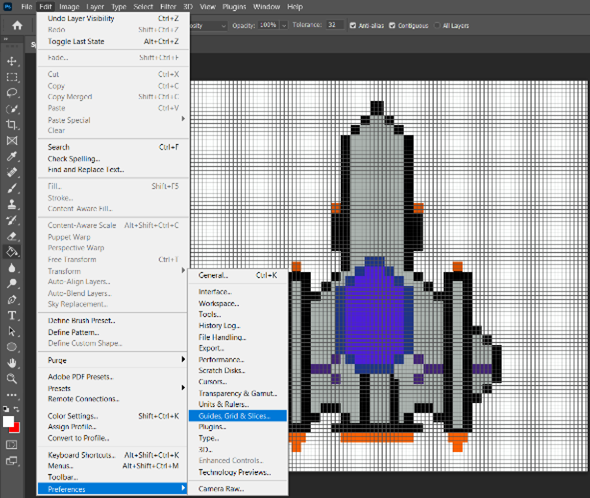
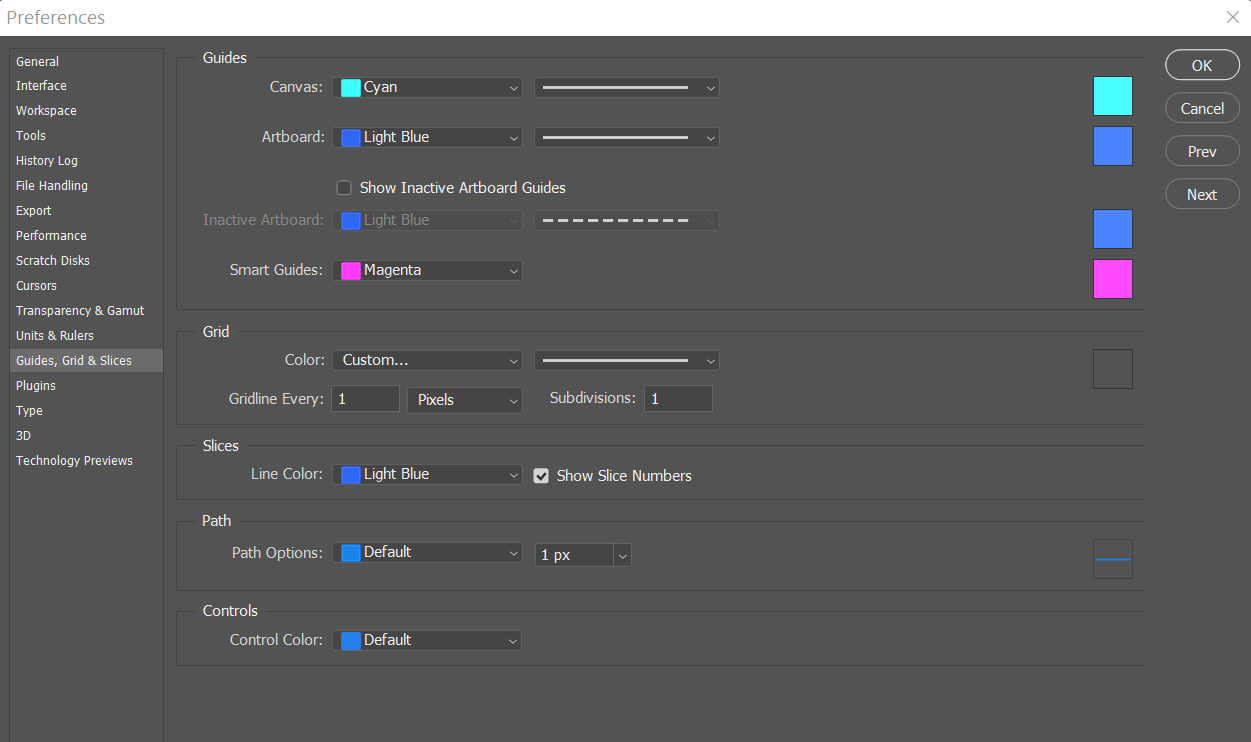
To do this in Photoshop, you need to select the edit button that is on the top of the interface then scroll down until you find the preferences button then hover over it with your mouse and click on the option that is for grids and now it will open the preferences panel for these options and from here you will be able to set the grid to appear every 1 pixel. Lastly, to make the grid show up on your canvas all you need to do is to click on the view button that is on the top of the screen and then click on the select the show button and then click on the grid option and now it will appear on your canvas, and you can see what these options look like below.
Pixel Art that I Created
Spaceship Pixel Art
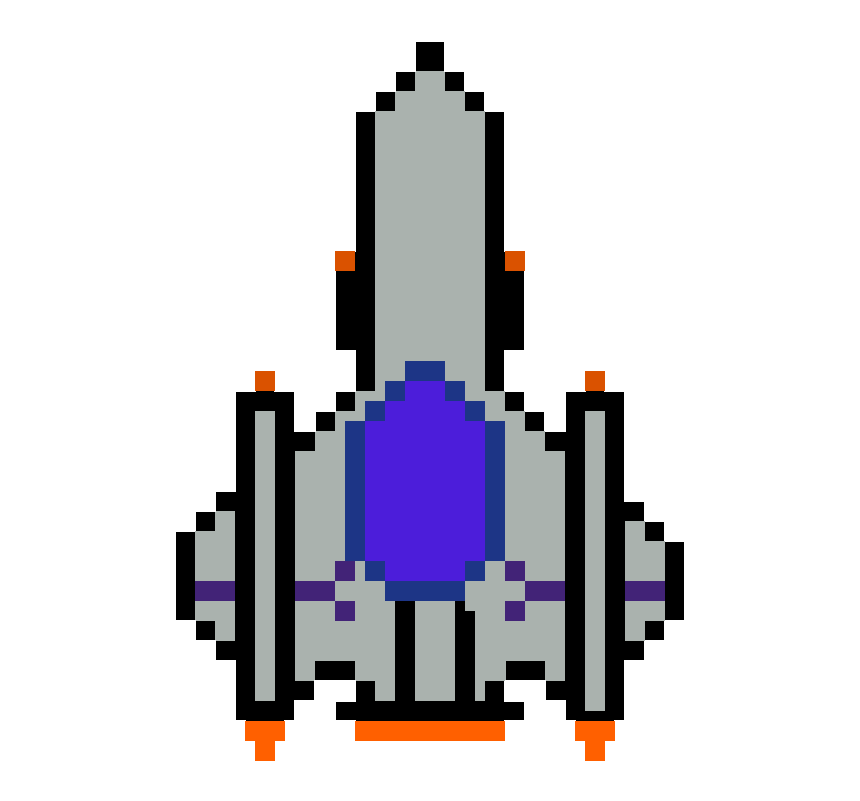
Now, that the initial setup is out the way I can now start drawing some pixel art and to draw any pixel art in Photoshop you will use the pencil tool and set the size of it to 1 pixel and by doing this it will draw one pixel on your canvas. Now I will be discussing the pixel art that I created and firstly I will be looking at the pixel art that I made of a spaceship. I designed it from a top-down view and the reason I did this is that this pixel art was going to be used in a game project that was going to have a top-down perspective and if I designed it any other way it wouldn’t fit with the rest of the project.
Also, a top-down view means that you will be able to view anything from the top then you will be looking down at whatever you’re looking at for example if I was on the roof of a building and was looking down onto a city this would be from a top-down perspective.
The reason that I chose to design a spaceship is that this game project was going to be space-themed and the main player would be playing the spaceship so I designed it in a couple of ways to make it stand out against everything else that would be in this game such as I used a black outline on the whole spaceship and by doing this it will make it contrast well against the rest of the colours on the spaceship especially the main grey colour scheme of this spaceship.
Also, I used some other colours on this pixel art to highlight those particular parts of the spaceship such as I used a bright orange to highlight the flames that are coming from the exhaust of the spaceship and the reason this stands out against the rest of the ship is due to compared to rest of the ship that used darker colours as the main colour scheme of the ship is a dark grey so due to this colour being brighter than the rest it stands out because of it.
Evaluating my Spaceship Pixel Art
Now, I am going to look back on this specific pixel art that I created and see what I could have changed or done to improve it so firstly I could have added more shading to it like for example, I could have used a darker shade of grey on some parts of the spaceship to create the effect of lighting on one side of the spaceship. So, for example, if this spaceship was real, it wouldn’t always have the same shade of colour this depends on how the light is reflecting on it so one side might be darker than the other so if I added a darker shade of grey onto one side of this pixel art I would be able to create this effect.
UFO Pixel Art

Next, I am going to discuss pixel art that I made of a UFO, and this was to be included in the same game project that I mentioned earlier, and this pixel art is for the enemies in that game as the game had a space theme, I decided to create UFOs to match the theme of that project.
Also, with this pixel art, I tried to make it simple as possible as pixel art itself is based on art from older games that were very simple in design so by making it simple it matches those older games in terms of what they would have looked and with all my pixel art I was trying to get that retro aesthetic when designing them.
Also, another good reason to go with simple designs when creating any form of art is that you don’t want to overwhelm a person when they look at your artwork and what I mean by this is that if there was too much going on in one piece a person wouldn’t know where they are supposed to look in that piece as you can bring a person’s attention to a particular point in art by making it stand out like using a different colour that contrasts well against the rest that art piece.
In this case, I have done this in this pixel art by that on the top of this pixel art I have chosen a dark blue and the reason this stands out is due to the rest of the UFO has a dark grey colour scheme so due to it being a different colour it will stand out and highlight that particular part of the UFO.
Evaluation of UFO Pixel Art
Now I am going to discuss what I could have changed or done to improve this pixel art, so firstly I could have added more shading as now it looks very flat and basic so by adding more shading like some to represent shadows and lighting on the UFO would have looked like this would have added more depth to this pixel art.